 By nDir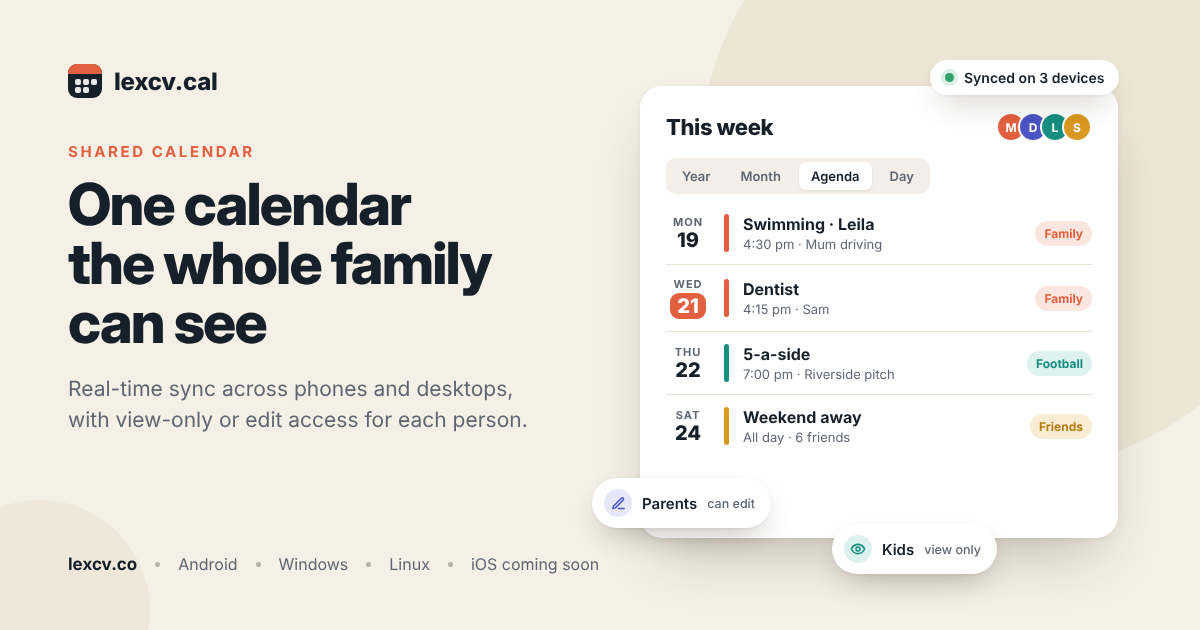
It’s Sunday night and someone in the kitchen asks who’s taking Leila to swimming on Thursday. The paper calendar on the fridge says Mum. The family WhatsApp group, about forty messages up, says Dad agreed to swap. Dad’s work calendar, which nobody else can see, has a five o’clock meeting in it that he forgot to mention.
Most households run on some mix of those three, and the gaps between them are where the missed pickups and double-booked Saturdays come from. A shared calendar puts everybody’s plans in one place that updates on every phone and computer at once, so the question on Sunday night has one answer instead of three.
That’s the idea behind lexcv.cal, the first app from Lexcv, a new software company based in London. On Google Play its full name is lexcv.cal Shared Calendar, and it’s built for families, friends and small groups who want to see the same plans without passing screenshots back and forth.
How the sharing works
You make a calendar, say one called Family, and invite the people who should see it. Anything added to it shows up for all of them, whether they’re on an Android phone, a Windows laptop or an Ubuntu desktop. Sync happens in real time, so if you type in a dentist appointment on your phone while you’re still standing at reception, it’s on your partner’s laptop before you’ve reached the car park.
You aren’t limited to one calendar, either. Plenty of people end up with a family calendar, a separate one for a Sunday football group or a book club, and a private one just for themselves, each in its own colour so the week is easy to read at a glance.
Permissions, the part parents ask about
Most arguments about shared calendars come down to who’s allowed to change things. In lexcv.cal you set permissions for each person on each calendar, so somebody can view a calendar without being able to edit it. In practice that means a twelve-year-old can check what time training starts but can’t quietly delete the orthodontist appointment, while both parents can add and move events whenever they need to.
Calendar owners can also stop people creating or editing events in the past, which sounds minor until somebody tidies up last month and the record of who drove where goes with it.
| Person | Access | Why |
|---|---|---|
| Parents | Can edit | Both add appointments and swap pickups |
| Children and teenagers | View only | They see the plans but can’t change them |
| Grandparents | View only | They know when to expect the kids |
| Friends’ group | Can edit, on its own calendar | Everyone adds their own dates |
Phones, laptops and desktops
lexcv.cal runs on Android through Google Play, and there are desktop apps for Windows 11 and Ubuntu Linux, with an iOS version to follow. You can pair a desktop with a phone, or keep several phones in step, and changes show up on all of them as soon as they’re made.
The Linux support is worth a mention, honestly, because people running Ubuntu at home don’t often get a proper calendar app built with them in mind. It comes as a direct download and is on the Snap Store too.
Day-to-day features
There are Year, Month, Agenda and Day views, and you can zoom in and jump between dates. My guess is most people will live in Agenda on their phone and Month on a bigger screen.
- Repeating events, like weekly training.
- Reminders, with push notifications on Android.
- Colour-coded calendars.
- Light and dark themes.
- Seven interface languages.
Those languages are English, French, Spanish, Portuguese, Hindi, Bengali and Punjabi, which matters more than it might seem in families where the grandparents would rather read something other than English.
Not only for families
Friends planning anything bigger than a coffee run into the same mess. Take six people trying to fix a long weekend away in the spring, where two of them work shifts, one has a wedding in April and nobody can remember which Fridays are free. A group chat turns that into a scroll of maybes. A shared calendar with everyone able to edit lets each person block out the dates they can’t do, and the gaps that are left over are your weekend.
The same works for a five-a-side team, a running club or a group of parents sharing the school run, where the rota changes every half term and somebody always has the old version saved on their phone.
What happens to your data
A family calendar holds a surprising amount about you: where the kids are after school, when the house is empty, which doctor somebody sees. Lexcv says it will never use your calendars or events to train AI models, never use your personal data for advertising and never sell it to third parties. Data is encrypted in transit with TLS and at rest with AES-256. Whichever calendar app you end up choosing, those are fair questions to put to it.
Setting it up for a household
If I were setting this up for a family, I’d start small, with one shared calendar that both adults can edit, and only put things on it that involve more than one person, like school events, pickups, appointments and visits from relatives. Then I’d add the kids as viewers. Once that’s working, a second calendar for a friends’ group or a sports team is easy to add, and everyone keeps their personal plans in a private calendar so the family one doesn’t get cluttered.
Getting lexcv.cal
The Android app is on Google Play, and the Windows and Linux versions can be downloaded from lexcv.co/cal. iOS support is on the way, so anyone in the family with an iPhone will be able to join later.
If your family currently runs on a fridge calendar and a group chat, it’s worth trying for a couple of weeks to see whether the Sunday night questions get any easier.